Fruits and Vegetables for Kids
- 4.2
- Rating
- 5.00M
- Installs
- Free
- Price
 Analysis by App-foxy
I spent time with Fruits and Vegetables for Kids as a simple early-learning app, and its appeal is easy to understand: it turns familiar food words into a small play session for young children. The focus is narrow, which is a strength when a child is beginning to recognize fruit and vegetable names, but it also means this is not a complete preschool curriculum or a broad educational game. I see it as a short, focused activity that works best alongside conversation, picture books, and real food experiences.
The app belongs to the parenting category and is made by CLEVERBIT. It is free, suitable for Everyone, and has reached more than five million installs. Its average score is 4.2 from roughly twenty-five thousand ratings, with about two hundred reviews, so there is a sizeable audience behind it without that popularity being a reason to overlook its limitations.
How the learning experience feels in everyday use
The central idea is straightforward: children learn about fruits and vegetables through play. That simplicity matters for a toddler or preschooler who may become frustrated by menus, lengthy explanations, or activities that demand reading. A child can approach the app with an adult nearby, hear or identify familiar food items, and connect the image on screen with something they may later see in the kitchen or at the supermarket.
You May Also Like

 AccuWeather: Weather Radar
AccuWeather Review: A Quick, Clear Forecast for Everyday Decisions
For everyday plans, the best forecast is the one you can understand quickly. AccuWeather makes rain timing, radar, and local conditions easy to act on, with a few trade-offs.

 Hill Climb Racing
Why Hill Climb Racing Still Turns Crashes Into One More Run
A tiny car, a bumpy hill and one more upgrade: Hill Climb Racing keeps resurfacing because its simple chaos makes every near-miss feel personal.

 AliExpress - Shopping App
AliExpress Makes Global Shopping Feel Personal, but Shoppers Bear the Risk
AliExpress turns a global marketplace into a pocket-sized discovery engine. Its reach is useful, its shopping loop compelling, and its trade-offs easy to miss.

 Lords Mobile: Kingdom Wars
Lords Mobile Is a Kingdom-Building Routine, Not a Quick Match
A case-by-case verdict on the building, battles, device demands, and social commitments that make Lords Mobile rewarding for some players and exhausting for others.

 PDF Scanner app - TapScanner
TapScanner Makes Paperwork Easier to Capture, Check, and Share
TapScanner makes scanning with a phone feel less like a rescue operation and more like a dependable step in getting work done. Its capture tools are useful, though not flawless.

 Block Blast!
 Shows How Much a Puzzle Game Can Leave Out
A quiet grid game shows why puzzle players increasingly value instant clarity, repeatable skill and low-pressure play—and where the genre still needs to catch up.
More From Our News Desk
View All News


In my experience, the best way to use it is not as a passive screen session. I would sit with a child and turn each item into a small conversation: “Have you eaten this?” “What color is it?” “Is it crunchy or soft?” The app provides the prompt, while the adult adds the language practice that makes the activity more meaningful. That approach also helps children who already recognize the pictures but still need support saying the words clearly.
A realistic use case is a short session before preparing lunch. A parent can let the child explore a few food names, then bring one matching ingredient to the table. The digital image becomes a bridge to a real object rather than an isolated screen exercise. This is a more valuable workflow than handing over a device and expecting the app alone to teach vocabulary.
It can also fit into a waiting situation, such as a quiet moment before an appointment or while an adult finishes a small household task. I would keep those sessions brief and supervised, especially with very young children. The app is most useful when it starts an interaction, not when it is treated as a substitute for one.
A focused topic that is easy for young children to understand
Many children’s learning apps try to cover colors, numbers, animals, shapes, letters, and several other topics at once. This one stays with fruits and vegetables. That gives it a clear purpose: if your child is currently learning food vocabulary, there is less distraction than in a large collection of unrelated mini-games.
The subject also offers an advantage beyond memorization. Food is part of everyday life, so parents can reinforce the lesson naturally. A child can compare a picture with an apple in a lunchbox, look for a carrot at the store, or sort foods by color after using the app. Those follow-up activities cost nothing and make the app feel less like a standalone toy.
There is a useful trade-off here. A narrow subject can help a beginner concentrate, but a child looking for constant novelty may finish exploring it quickly. I would recommend it as one small tool in a rotation, not as the only educational app on a device.
What parents should expect from the interface
The experience is designed around recognition and repetition rather than complex problem-solving. That makes it approachable, but it also limits the depth of the challenge. Older preschoolers who already know a wide range of food names may need an adult to extend the activity with questions, comparisons, or a real-world task.
I would not choose this app expecting detailed nutrition lessons, recipes, meal planning, or a structured course for parents. Its purpose is much more basic: introduce children to fruit and vegetable vocabulary through play. That clear boundary is important because it prevents disappointment and helps families use it for the job it actually handles.
Another practical point is that a young child may not understand every item simply from seeing a picture. Unfamiliar produce, regional naming differences, or pronunciation challenges can require explanation. If a child calls an item by a family nickname, I would accept that first and then gently add the more standard word. The app can support language growth without turning the moment into a test.
Free access and the value it provides
The app is free, so the basic decision is uncomplicated: families can try it without committing money. That makes it easier to test with a child who may or may not enjoy this kind of learning activity. It is also useful for parents who want a small food-themed resource rather than a paid subscription or a large educational platform.
Because the price is free, I judge its value mainly by whether it earns a place in a child’s routine. For a beginner learning everyday vocabulary, it can do that. The strongest value comes when the app is paired with a meal, grocery trip, or sorting game at home. In that setting, it acts as a prompt for repetition and conversation, which is more useful than simply counting minutes spent on the screen.
I would be careful not to confuse free access with unlimited educational value. A free app can still be a poor fit if it does not match a child’s age, attention span, or learning goal. Here, the focused food theme is worthwhile for the right child, while a family seeking advanced literacy, numeracy, or broader curriculum coverage will probably need another resource as well.
The developer is CLEVERBIT, and the app was released on December 6, 2013. Its current version is 9.6.2, and it requires at least operating system 7.1. Those details make it relevant for families using an older compatible device, although the actual experience will still depend on the device and the child’s comfort with touch controls.
The age rating is Everyone, which matches the gentle educational subject. Even so, an age label does not tell a parent whether the learning level is ideal for a particular child. A two-year-old may need help identifying the images and repeating words, while an older child may use the same material as a starting point for spelling, categorizing, or discussing healthy choices.
Three ways to get more from a short session
First, I would use a “look, say, find” routine. Let the child look at an item, say its name, and then find the real food at home or in a picture book. This adds a memory cue that the app cannot provide on its own and helps reveal whether the child recognizes the object or is only tapping through familiar screens.
Second, I would change the questions instead of repeating the same prompt. Ask about color one day, texture another day, and where the food grows on another occasion. This keeps a narrow topic fresh without pretending that the app itself contains a complete lesson plan.
Third, I would use the app before a tasting activity rather than after a child refuses a new food. Previewing a few items can make them less unfamiliar, but I would never pressure a child to eat something because it appeared on screen. The educational goal is recognition and language, not forcing food choices.
These methods also help parents judge progress more realistically. A child may remember a word but not identify the food in a different setting. That is normal early learning, and it is why the follow-up conversation matters. The app can provide repetition; the adult supplies context, patience, and correction.
Where the free format may feel limited
The main limitation is scope. A child who wants a story, characters, levels, or a changing challenge may find the experience less engaging than a larger game. Likewise, parents searching for detailed progress tracking or a more formal teaching sequence should compare it with dedicated preschool learning platforms rather than assuming this small app will cover everything.
Repetition is another possible friction point. Repetition is helpful for first vocabulary, but it can become predictable once a child knows the material. I would watch the child’s behavior: if they are naming items and asking questions, continue; if they are tapping without interest, move to a real-world activity or another subject.
There is also a difference between learning a label and understanding a category. Knowing that something is called a carrot does not automatically teach the child that carrots and broccoli are vegetables, or that foods can be grouped by color, shape, taste, or where they grow. Parents can add those connections, but they should recognize that the app is a starting point rather than a full concept-building program.
Who is most likely to get real value?
I think this app is best for parents of toddlers and younger preschoolers who are building everyday vocabulary. It is especially suitable when a child enjoys picture-based activities and benefits from hearing the same words several times. It can also help families introduce food names in a relaxed way before a child encounters unfamiliar produce in daily life.
It may be helpful for a child learning English as an additional language, provided an adult is available to model pronunciation and explain the images. The food theme is concrete, and concrete objects are often easier to discuss than abstract ideas. Still, the app should supplement, not replace, broader language practice with people.
Parents can also use it with children who are selective about food, but expectations need to stay realistic. Seeing a vegetable on a screen will not automatically make a child willing to taste it. The benefit is more modest and more practical: the child may become familiar with the name and appearance, giving the adult another opening for a calm conversation.
I would skip it if your child already knows basic fruit and vegetable vocabulary and needs more demanding activities. In that case, a literacy app, a classification game, or a hands-on cooking activity may provide better value. I would also choose something else if you specifically need parental reports, a large progression system, or lessons that move beyond food recognition.
Compared with a picture book, the app offers a more interactive way to repeat the topic, but a book may provide richer language, stories, and opportunities to discuss details. Compared with a general preschool game, this app is more focused but less varied. Compared with real kitchen or grocery activities, it is more convenient but less sensory and less social. For me, the best choice is not either-or: use the app for a quick introduction, then let real objects and conversation do the deeper teaching.
Device fit and family routine
Since the minimum operating system is 7.1, families with an older compatible device may be able to use it without replacing hardware. I would still test the controls with the intended child before planning a routine. Young children can struggle with small touch targets, accidental exits, or unfamiliar navigation, and an adult may need to begin each session.
A good routine would be five or ten minutes followed by an offline activity, rather than leaving the app available indefinitely. Afterward, ask the child to name one item, draw one item, or find one item in the kitchen. This gives the screen time a clear endpoint and makes it easier to see whether the child is learning rather than merely staying occupied.
If siblings use the same device, the app can work as a shared activity, but children at different stages may need different challenges. One child might practice naming, while another sorts foods or explains a favorite recipe. That flexibility comes from the adult’s questions, not from expecting the app to adapt every lesson automatically.
My verdict on installing it
I would recommend trying Fruits and Vegetables for Kids if you want a free, focused introduction to food vocabulary for a young child. Its strongest quality is its clarity: it does one small educational job without asking families to pay for access. The large install base and 4.2 average show that many families have found it useful, although popularity should not replace checking whether the topic matches your child.
My recommendation comes with a condition: treat it as a conversation starter, not a complete learning system. Use it before a meal, during a quiet waiting period, or as a prompt for finding real foods. Add questions about color, texture, taste, and category, and stop when the child loses interest. That approach gives the free app a practical role without overstating what it can teach.
For a beginner, the focused subject is an advantage. For an advanced preschool learner, the same focus may feel too limited. Families wanting stories, broader subjects, measurable progression, or more complex challenges will be better served by a different educational option. Families wanting a simple way to revisit familiar food words, however, have little financial risk in giving it a try.
Overall, I see it as a modest but useful parenting resource. It will not replace books, play, conversation, or real experiences with food, and it should not be judged by those standards. Used in the right place, it gives a child a friendly prompt to look, listen, and talk. The best value comes from what happens after the screen is turned off.
FAQs for Fruits and Vegetables for Kids
01What is Fruits and Vegetables for Kids?
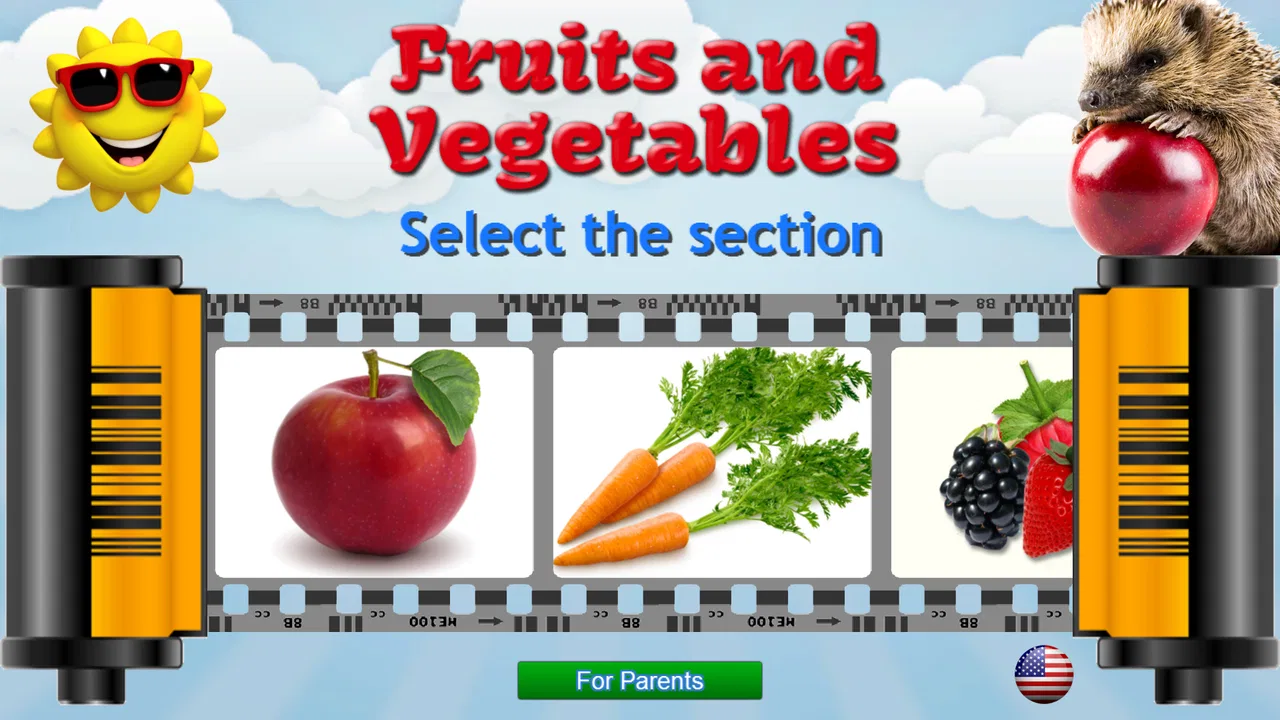
Fruits and Vegetables for Kids is an educational app designed to help young children recognize common fruits and vegetables in a colorful, playful way. It typically combines pictures, sounds, simple names, and interactive activities to make early learning more engaging. The app may be useful for preschoolers and early learners who are beginning to expand their vocabulary and learn about healthy foods.
02What age group is Fruits and Vegetables for Kids suitable for?
The app is mainly suitable for preschool children and young learners, generally around ages two to six, although the ideal age depends on the child’s reading and attention level. Younger children can learn by listening and matching pictures, while older preschoolers may practice recognizing words and spelling. Parents should review the available activities to confirm that the difficulty matches their child’s abilities.
03Does Fruits and Vegetables for Kids require an internet connection?
Many basic learning activities in Fruits and Vegetables for Kids may work without a constant internet connection once the app has been installed. However, internet access can still be required for downloading the app, receiving updates, restoring purchases, or loading advertisements and additional content. Parents should test the app in offline mode before traveling or giving it to a child without connectivity.
04Is Fruits and Vegetables for Kids safe for children to use?
The app is intended for children, but parents should still check its privacy policy, advertising settings, and available parental controls before use. Some free versions may contain advertisements, links to other apps, or optional purchases. It is best to open the application with a parent first, disable unwanted purchases where possible, and supervise younger children while they explore the activities.
05Is Fruits and Vegetables for Kids free to download?
Fruits and Vegetables for Kids may be available as a free download, although the exact pricing model can vary between Android and iOS versions. Some editions include advertisements, locked activities, or optional in-app purchases for extra content. Before installing, check the store listing carefully for subscription details, supported devices, age ratings, and whether all learning features are included at no additional cost.
Pros
- Bright visuals make fruits and vegetables easy for young children to recognize.
- Simple interactions are suitable for preschoolers developing basic touch skills.
- Educational activities encourage healthy food awareness through playful learning.
- Short activities help maintain attention without overwhelming younger users.
- Child-friendly design makes the app easy to explore with little assistance.
Cons
- Some activities may feel repetitive after extended use.
- Learning content may be too basic for older children.
- Limited variety could reduce replay value over time.
- Parents may want more progress tracking or learning reports.
- Sound effects and animations may become distracting during longer sessions.

Fruits and Vegetables for Kids
Gallery